





Best Game Engines for Beginners: Top 5 Compared
 By Deepak SehrawatPublished on Oct 14, 2026
Choosing the best game development engine for beginners depends on the type of game you want to make, design, your programming experience and the computer you use. Some engines make it easier to create 2D games with visual tools, while others provide more advanced systems for building 3D worlds.
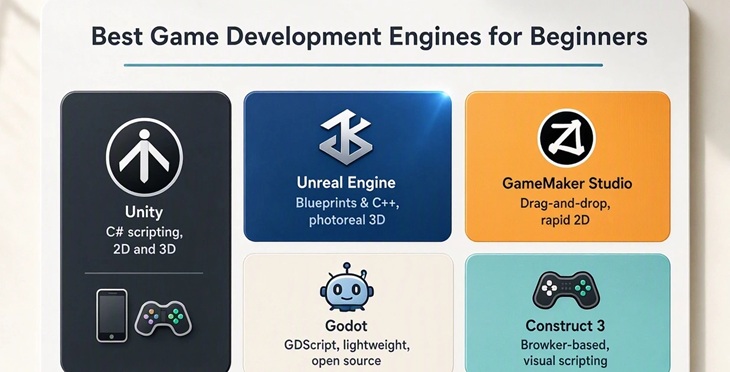
Godot, Unity, Unreal Engine, GameMaker and Construct are all worth considering, but they suit different needs. This guide compares their strengths, learning curves and ideal use cases to help you choose an engine for your first game.
What Makes a Game Engine Beginner-Friendly?
A good first engine should not make simple tasks unnecessarily difficult. Clear menus, useful tutorials and quick testing can make the learning process less frustrating.
Several points are worth checking before installing an engine:
Ease of learning and navigation
Support for 2D or 3D development
Programming requirements
Quality of tutorials and documentation
Hardware requirements
Export options for different platforms
Community support and learning resources
Pricing and licensing terms
A beginner does not need the most powerful engine available. A tool that makes the first small game possible is often the better starting point.
Godot: A Simple Starting Point for 2D:
Godot is a strong starting point for beginners who want an integrated development environment without a licensing cost. Its scene-and-node system helps organize game objects and reusable components, while GDScript provides an approachable route into programming.
Godot also supports 3D development, so beginners can move beyond 2D projects as their skills grow.
It is particularly worth considering for 2D platformers, puzzle games, arcade games and small indie projects.
Godot works well for:
2D platformers
Puzzle games
Arcade games
Small indie projects
Beginners learning game programming
The biggest attraction is its straightforward approach. There is less pressure to understand a huge collection of advanced features before getting a basic game running.
Unity: A Broad Choice for New Developers:
Unity is worth considering if you want to explore both 2D and 3D development, build mobile games or learn C# while creating playable projects. Its broad set of tools can support increasingly ambitious games, although its editor and workflows take time to learn.
Before committing to Unity, check the current Personal plan eligibility requirements and licensing terms, especially if you intend to release a commercial game.
It is a sensible choice for beginners interested in:
Mobile games
2D and 3D development
Indie games
C# programming
Building skills for larger projects
Unreal Engine: A Serious Option for 3D:
Unreal Engine is known for detailed graphics and large-scale 3D development. It is more demanding than some beginner-focused tools, but that does not make it unsuitable for newcomers.
Its Blueprint visual scripting system gives beginners a way to create gameplay logic without immediately writing large amounts of C++ code.
Unreal makes the most sense when the goal is to learn 3D development, create realistic environments or eventually work with more advanced graphics.
The trade-off is simple: there is more to learn.
GameMaker: Strong for 2D Projects:
GameMaker takes a more focused approach. It is particularly useful for 2D games and has tools designed to get gameplay working without requiring beginners to build every underlying system.
This makes it a practical choice for platformers, top-down games and arcade projects.
For someone whose first idea is a small 2D game rather than a realistic 3D world, GameMaker can be easier to handle than a much larger engine.
Construct: Useful for Visual Game Creation:
Construct is positioned well for visual game creation. Clarify that visual development does not mean the tool is incapable of making complex interactions; rather, it lets users work with event-based logic instead of making traditional programming the first hurdle.
You should also distinguish between browser-based game creation and publishing a game to a browser. They are related but not identical. Readers should check the current plan's export and publishing limits before choosing a tool for a specific project.
Quick Comparison:
Engine | Best For | Learning Curve | Main Advantage |
Unity | 2D, 3D and mobile | Moderate | Wide range of tools |
Godot | 2D and indie games | Low to moderate | Simple workflow |
Unreal Engine | 3D games | Moderate to high | Advanced 3D features |
Construct | 2D and browser games | Low | Visual development |
GameMaker | 2D games | Low to moderate | Fast game creation |
How to Choose Your First Game Engine
Before installing an engine, consider these four factors:
1. The type of game: For a 2D platformer or puzzle game, Godot or GameMaker may be a practical starting point. For a visually rich 3D game, Unreal Engine may be more suitable.
2. Your programming experience: Construct's visual workflow can help beginners start with game logic. Godot introduces programming through GDScript, while Unity uses C#. Unreal Engine offers Blueprint visual scripting alongside C++.
3. Your computer's capabilities: Check the engine's system requirements before downloading it. Larger 3D development environments may need more capable hardware than a simple 2D project.
4. Your budget and publishing plans: Compare the current license terms, export options and commercial-use requirements. A tool that is free to learn may have different conditions for selling a finished game.
The First Game Should Be Small:
The engine is only part of the learning process. Project size matters just as much.
A first game can focus on a few basic features:
Player movement
One playable level
Simple enemies or obstacles
A scoring system
Basic sound
Start and restart options
Finishing a small game teaches more than spending months building an oversized project that never becomes playable.
Should the first game be made in 2D or 3D?
A small 2D game is often easier for learning basic concepts such as movement, collisions, scoring and game logic. Once those ideas become familiar, moving into 3D is less intimidating.
Pick the Tool Around the Project:
Choosing a game engine should not become a competition over which software has the longest feature list. The practical question is what the first game actually needs.
For 2D projects, Godot and GameMaker can keep the process manageable. Unity offers a broader path into 2D, 3D and mobile development, while Unreal is a natural choice for beginners drawn toward advanced 3D. Construct stands out for visual, browser-friendly game creation.
The best beginner engine is ultimately the one that makes it easier to build, test and finish a first game. That first finished project is where most of the real learning begins.
Frequently Asked Questions (FAQs)
Which game engine is easiest for beginners?
Godot, GameMaker and Construct are generally approachable options, especially for beginners starting with 2D games.
Is Unity suitable for someone with no coding experience?
Yes. Unity can be used by beginners, although learning basic C# gradually will make it much easier to build more advanced gameplay.
Is Unreal Engine too difficult for beginners?
Not necessarily. Beginners interested in 3D can start with Unreal, and Blueprint visual scripting provides an alternative to writing C++ immediately.